A hack for missing @at-root for Tailwind CSS Plugin

Introduction
I was creating a Tailwind CSS ("TW") plugin, @downwindcss/debug. for a utility outline-{n} to apply outline.
The utility should apply to a whole page when a user adds the utility class anywhere in the DOM tree.
Basically @at-root in SASS.
Problems and Attempts
When you add a utility, you can use a CSS-in-JS syntax, to refer to the parent with & (ampersand).
Attempt #1
My attempt was to do was to apply to descendants of <body /> (line #5, "body *, &").
const numberedOutlines = Object.entries(values)
  .filter(([key]) => key !== "DEFAULT")
  .map(([key, value]) => ({
    [`.${e(`outline-${key}`)}`]: {
      "body > *": {
        outline: `${value} solid red`,
      },
    },
  }))
But TW appended .outline to the output.
.outline body > * {
  outline: 1px solid red;
}
That's not the selector I wanted. I wanted a simple body > * to apply the outline to the whole page!
Attempt #2
As & refers to the parent selector, .outline, I was adding & either to the left or to the right separated by ,.
"body > *, &": {
    outline: `${value} solid red`,
},

// or

"&, body > *": {
    outline: `${value} solid red`,
},
But both of them still appeneded .outline in front of body like,
.outline body > *, .outline
// or
.outline, .outline body > *
Working Code
Ok, frustrated I was, I decided to hack it by excluding the current & and including it again (body * > :not(&), &).
const numberedOutlines = Object.entries(values)
  .filter(([key]) => key !== "DEFAULT")
  .map(([key, value]) => ({
    [`.${e(`outline-${key}`)}`]: {
      "body * > :not(&), &": {
        outline: `${value} solid red`,
      },
    },
  }))
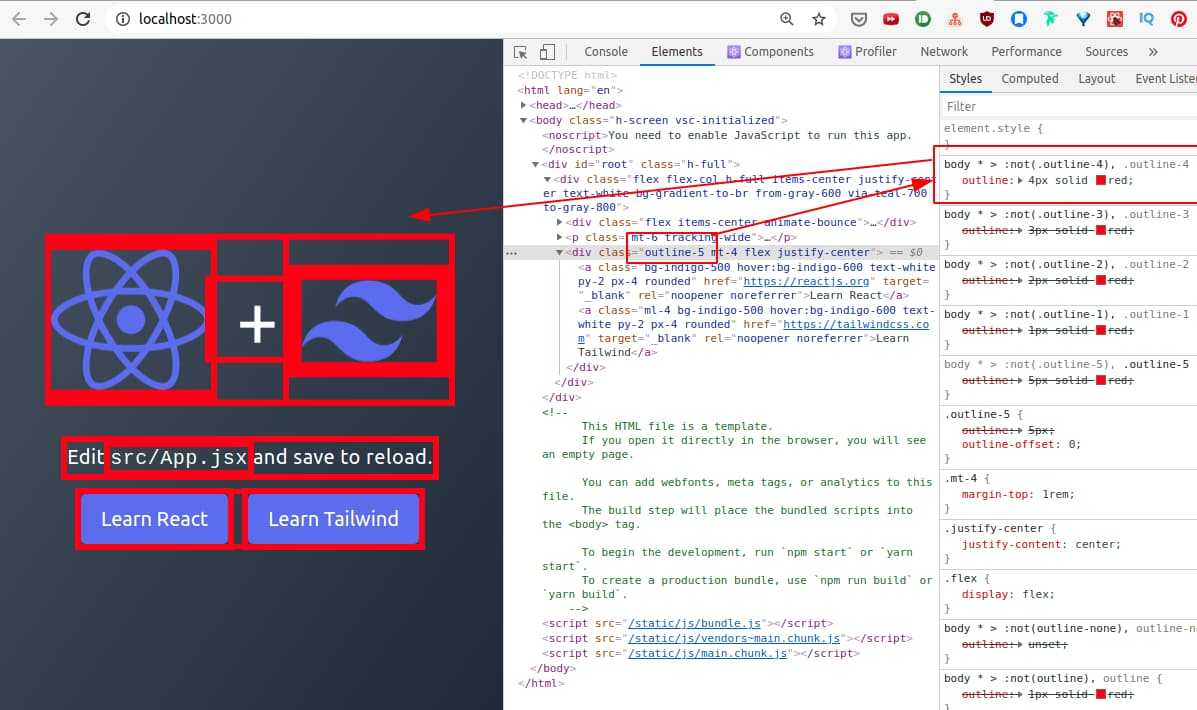
You can see that outline-5 was applied somewhere in the DOM tree and outline was applied to the whole page.
(disregard the fact that it's showing outline-4 cuz it's WIP 😅)
Webmentions
Loading counts...