Docusaurus Alpha TypeScript with Husky

Introduction
I wanted to use Docusaurus v2, which supports MDX but is in Alpha.
This is just my cheatsheet on how to set it up with TypeScript and Commitizen support using Husky.
I will use yarn instead of npm.
Bootstrap Docusaurus
Create a new Docusaurus project.
https://v2.docusaurus.io/docs/installation
npx @docusaurus/init@next init [name] [template]e.g. npx @docusaurus/init@next init doc-demo classic
Set up TypeScript
1. Install TypeScript and types
yarn add -D typescript @docusaurus/module-type-aliases @types/react @types/react-router-dom @types/react-helmet @tsconfig/docusaurusImportant: Make sure that the version of @docusaurus/module-type-aliases matches that of @docusaurus/core in package.json.
I had trouble as the bootstrapped project used @docusaurus/core version of alpha.66 while the latest @docusaurus/module-type-aliases was alpha.51.
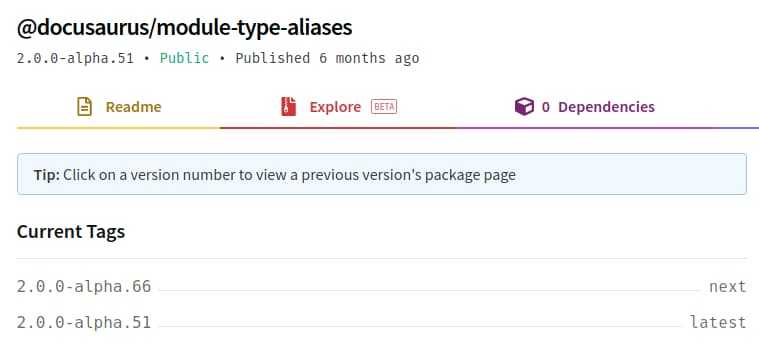
I manually upgraded @docusaurus/module-type-aliases to @docusaurus/module-type-aliases@2.0.0-alpha.66 like
yarn add -D @docusaurus/module-type-aliases@2.0.0-alpha.662. Configure tsconfig.json
Extend as shown in the official documentation.
https://v2.docusaurus.io/docs/typescript-support
{
  "extends": "@tsconfig/docusaurus/tsconfig.json",
  "include": ["src/"]
}
3. Rename the main page source extension
Change the ./src/pages/index.js to ./src/pages/index.tsx.
4. Add type-check to test TypeScript
Add type-check script in package.json.
"scripts": {
    ...
    "type-check": "tsc"
}
Run the command to see if there is any error.
yarn type-checkIf there is no error, you should be able to run it with yarn start.
Set up Commitizen with Husky
To enforce consistent commit message (I like Angular Commit Message Format), I will install Commitizen.
Checking it manually is taxing so I will use Husky to make it run during git commit.
I will also add TypeScript ESLint to see if there is any error (Is this needed when tsc is run with type-check???)
1. Install packages
To add commitizen, husky and eslint, run the following command
yarn add -D commitizen cz-conventional-changelog eslint eslint-config-prettier eslint-import-resolver-alias eslint-plugin-prettier eslint-plugin-react eslint-plugin-react-hooks husky lint-staged prettier @typescript-eslint/eslint-plugin@latest @typescript-eslint/parser2. Add scripts for husky and linting
In package.json,
  "scripts": {
    ...
    "cm": "cz",
    "lint": "eslint --ignore-path .gitignore . --ext ts --ext tsx --ext js --ext jsx",
    "lint:fix": "yarn lint --fix"
  },
3. Set up Commitizen for conventional log
In package.json, add the commitizen configuration
  "config": {
    "commitizen": {
      "path": "./node_modules/cz-conventional-changelog"
    }
  },
This will enforce the Angular commit message convention.
And add cz command.
4. Configure Lint-Staged
Create .lintstagedrc file in the project root and add following configuration
{
  "*.{js,jsx,ts,tsx}": ["yarn lint:fix", "git add"],
  "*.scss": ["prettier --write", "stylelint --fix", "git add"],
  "{*.{json,md}}": ["prettier --write", "git add"]
}
5. Configure Husky
Create .huskyrc file in the project root.
The following configuration will let husky run when git commit is typed.
What it does is to
{
  "hooks": {
    "prepare-commit-msg": "exec < /dev/tty && git cz --hook || true",
    "pre-commit": ["yarn type-check && lint-staged"]
  }
}
6. Configure ESLint
Create .eslintrc.js in the project root.
It is based on Setting up a GatsbyJS starter with TypeScript, ESLint, Prettier and pre-commit hooks.
/**
 * based on Setting up the linters
 * https://www.arden.nl/setting-up-a-gatsby-js-starter-with-type-script-es-lint-prettier-and-pre-commit-hooks
 */
module.exports = {
  parser: "@typescript-eslint/parser", // Specifies the ESLint parser
  extends: [
    "eslint:recommended",
    "plugin:react/recommended",
    "plugin:@typescript-eslint/recommended",
    "prettier/@typescript-eslint",
    "plugin:prettier/recommended",
    "plugin:react-hooks/recommended",
  ],
  settings: {
    react: {
      version: "detect",
    },
    "import/resolver": {
      alias: [
        ["src", "./src"],
        ["components", "./src/components"],
        ["store", "./store"],
      ],
    },
  },
  env: {
    browser: true,
    node: true,
    es6: true,
  },
  plugins: ["@typescript-eslint", "react"],
  parserOptions: {
    ecmaFeatures: {
      jsx: true,
    },
    ecmaVersion: 2018, // Allows for the parsing of modern ECMAScript features
    sourceType: "module", // Allows for the use of imports
  },
  rules: {
    "react/prop-types": "off", // Disable prop-types as we use TypeScript for type checking
    "@typescript-eslint/explicit-function-return-type": "off",
  },
  overrides: [
    // Override some TypeScript rules just for .js files
    {
      files: ["*.js"],
      rules: {
        "@typescript-eslint/no-var-requires": "off", //
      },
    },
  ],
}
When you stage your files and type git commit, you should see commitzen-conventional-log prompt.
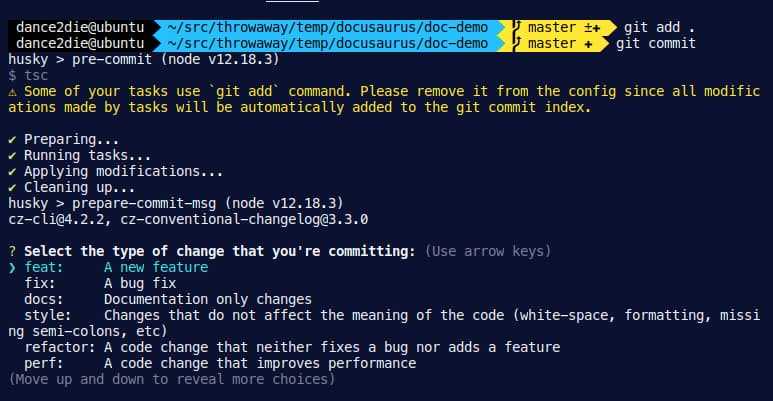
Image by Lynn Coetzee from Pixabay
Webmentions
Loading counts...