Displaying Multiple Google Charts in React (react-google-charts)

I was working on displaying multiple GitHub traffic charts using a Google Chart NPM package for React, react-google-charts.
Problem
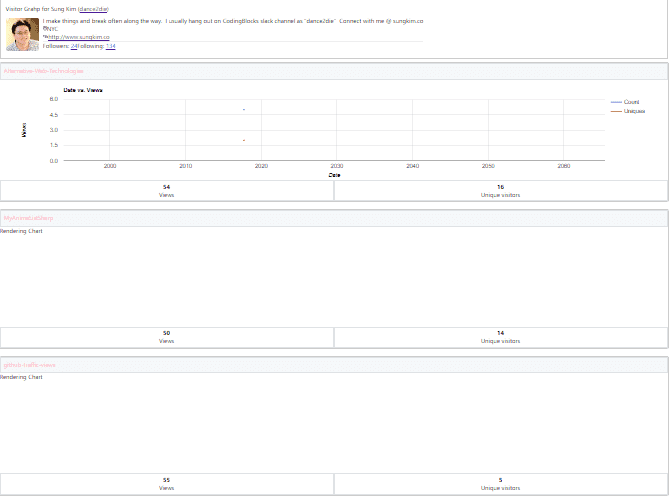
Out of many charts, only the first one chart is populated.
Question
How do we fix it?
TL;DR
Use a unique
graph_idvalue.
Getting Started by Copying & Pasting
Here is the sample code in Quick Start section.
| <div className={'my-pretty-chart-container'}> | |
| <Chart | |
| chartType="ScatterChart" | |
| data={[['Age', 'Weight'], [8, 12], [4, 5.5]]} | |
| options={{}} | |
| graph_id="ScatterChart" | |
| width="100%" | |
| height="400px" | |
| legend_toggle | |
| /> |
In my case, I needed to display a line chart so updated chartType to LineChart.
| <Chart | |
| chartType="LineChart" | |
| ... | |
| graph_id="LineChart" | |
| ... | |
| /> |
So the code for displaying multiple charts is as follows.
| const visitors = graphDetails | |
| .map(visitor => { | |
| ... | |
| return ( | |
| <Chart | |
| chartType="LineChart" | |
| ... | |
| graph_id="LineChart" | |
| ... | |
| />); | |
| }); |
But for some reason, it was populating one graph.
Resolution
After hours of researching and debugging, I found the problem.
Here you see that each chart had the same id="LineChart".
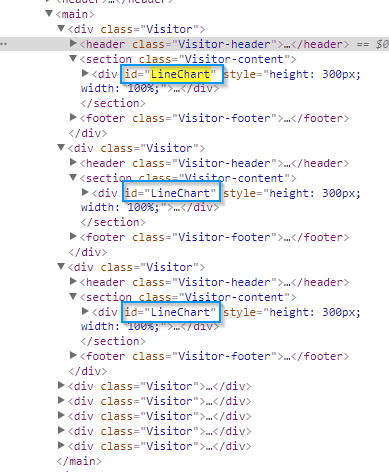
Each chart needs to have a unique ID. I chose an easy way out and used shortid NPM package.
| import shortid from 'shortid'; | |
| ... | |
| const visitors = graphDetails | |
| .map(visitor => { | |
| const id = shortid.generate(); | |
| ... | |
| return ( | |
| <Chart | |
| chartType="LineChart" | |
| ... | |
| graph_id={id} | |
| ... | |
| />); | |
| }); |
Conclusion
Each chart_id needs to be unique.
I hope you don't struggle to populate multiple Google Chart graphs.
You can find the commit detail on GitHub in my code.
Webmentions
Loading counts...